
Expose any data source as a local filesystem.
CBFS™ Connect lets you present databases, cloud storage, REST APIs, or any custom backend as ordinary drives and folders. All without writing a single line of kernel driver code.

USE CASES
What you can build with CBFS Connect
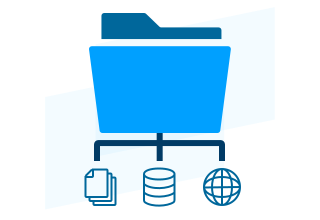
CBFS Connect gives you full control over the contents of a virtual filesystem: local or remote files, database records, REST services, or dynamically-generated content. If your application can access it, you can expose it as a drive.
Mapped network drives with custom I/O
Mount remote storage as a drive with full control over caching, partial writes, and access patterns, including applications that read files backwards or write in random offsets. Off-the-shelf connectors cannot handle that.
On-demand data delivery
Serve large files to applications only as specific bytes are requested, no full download required. Media players can seek into remote video, tools can open large archives without extracting them. Your handler fetches only what is needed.
Non-native filesystem formats
Some devices and platforms use filesystem formats that the host OS does not understand natively. CBFS Connect lets you present any proprietary storage format as a browsable drive, whether the source is a game console, embedded device, or legacy system.
Server assets in desktop apps
Design tools, video editors, and document suites expect files on disk. CBFS Connect lets you present server-managed assets as local files, fetched on demand. No bulk sync, no stale copies. The file your app opens is always the current version.
Database or API as a filesystem
Expose records, documents, or API responses as folders and files. Any tool that can open a file, whether scripts, legacy software, or reporting tools, can read live data from your backend without knowing what is behind it.
Bridging legacy applications
Applications that only read from disk can be connected to databases or remote services through a virtual drive, with no changes to the legacy app. It sees a normal filesystem; you control every read behind the scenes.
HOW IT WORKS
No kernel code required.
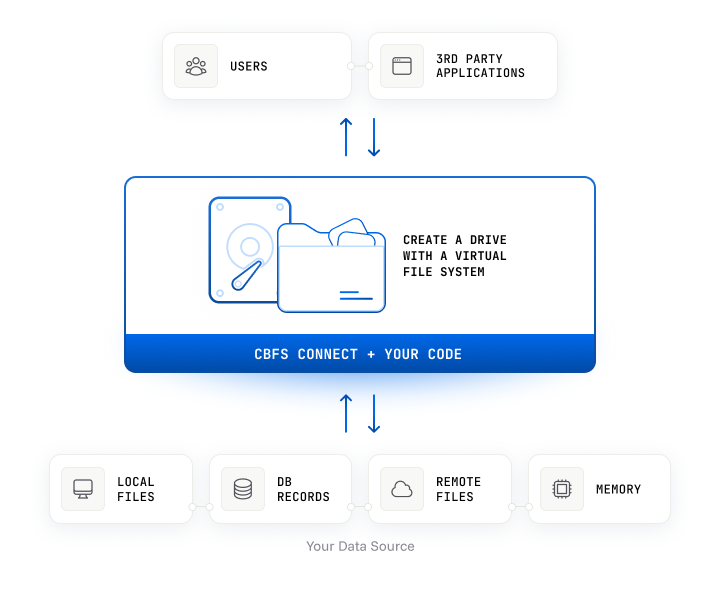
Kernel programming is hard, and as Apple's own documentation states, it should be avoided if at all possible. CBFS Connect provides a safer, more flexible approach: it acts as an intermediary between the filesystem and your code, proxying filesystem actions into callback events that execute in a separate user-space process.
By isolating your code from the kernel, CBFS Connect reduces the risk of security vulnerabilities and eliminates the risk of system crashes caused by application bugs. You implement the logic; the pre-built, signed driver handles the kernel.
With over 20 years of experience and trusted by hundreds of leading technology companies, we understand the kernel so you don't have to.
START BUILDING
Documentation & Resources
Online Documentation
Full API reference for all components and languages, with code examples for every method and event.
Read now
Knowledge Base
Troubleshooting guides, how-tos, and answers to common implementation questions.
Read nowGetting Started With CBFS
Step-by-step walkthrough for creating your first virtual filesystem using the CBFS component.
Read nowGetting Started With FUSE
Build cross-platform virtual filesystems using the FUSE-compatible API on Windows, Linux, and macOS.
Read nowCompare CBFS™ and FUSE
Side-by-side comparison of CBFS Connect and the FUSE filesystem library across platforms and use cases.
Read nowCompare CBFS™ Connect and Dokan
Side-by-side comparison of CBFS Connect and the open-source Dokan filesystem library.
Read nowSample Applications
Demonstrates the use of the CBCache component in common operations.

Shows how to use CBCache when implementing a virtual filesystem. Another locally accessible filesystem is used as a backend storage.
Demonstrates using the FUSE component to create a simple in-memory virtual drive with directory support with CBCache working as an intermediary caching mechanism.
Shows how the cache is used to proxy file reading and writing operations.
Shows how to route virtual filesystem requests to disk with simple on-the-fly encryption.
Shows how to route virtual filesystem requests to another locally accessible filesystem.
A virtual filesystem serving a local disk built with the NFS component.
Demonstrates using the FUSE component to create a simple in-memory virtual drive with directory support.
Demonstrates using the FUSE component to create a simple local file system-based virtual drive with directory support.
A simple in-memory virtual drive with directory support built with the CBFS component.
A simple in-memory virtual drive with directory support built with the NFS component.
A simple in-memory virtual drive with Windows Security (ACL) support.
FEATURES
Everything a production filesystem implementation requires
Tested And Proven
 Tested And Proven
The development of CBFS™ Connect is backed by decades of kernel experience, and the product is rigorously tested with hundreds of our internal tests as well as the tests developed by Microsoft for filesystem implementations. Callback Technologies components are trusted by leading technology companies around the world.
Create Robust Filesystem Implementations
CBFS™ Connect's performant, event-driven architecture allows your application to manage every aspect of your virtual filesystem's operation. You will quickly get from "idea" to "implemented" thanks to its consistent API and extensive documentation.
Leverage Any Data Source
You have full control over the contents of your virtual filesystem, so you can use any data source your application has access to. It can be local or remote, a database or REST service, static or dynamically-generated, or something else entirely.
Local NFS Component
The cross-platform NFS component provides a simple way to serve files to local clients on Windows, Linux, and macOS without the need for a kernel mode driver. The local NFS server is compatible with any NFS 4.1 client.
Enforce Custom Access Restrictions
Only your application knows the real location of your data, so you can create and enforce your own permission schemas specifying which users and third-party applications can access, view, or modify it.
Advanced Functionality
Support for many advanced features including named streams, directory change notifications, reparse points, fsctl requests, hard links, quotas, file IDs, short file names, Plug-n-Play, custom disk icons, and more!
Flexible Mounting Options
Includes support for network mounting points, session-local mounting points, and UNC paths. Mount disks as fixed or removable. Multiple mounting points per disk are supported.
Granular Control
Fine grained user access control supports advanced security requirements. Optimize for specific implementations with per-file and per-handle context objects, and in-memory or disk caching options.
Utilize NTFS Security Features
CBFS™ Connect supports all standard NTFS security mechanisms, allowing you to easily secure the contents of your virtual filesystem.
FUSE-Like Cross Platform Support
The cross-platform FUSE component brings a FUSE-like API to all supported platforms, which makes writing virtual filesystem apps for multiple OSes consistent and simple.
Docker Container Support
Create virtual drives within Docker containers. The driver is installed exclusively on the host and does not need to be part of the container initialization.
Transparent Encryption and Auditing
The extensible design of CBFS™ Connect makes it easy to add transparent file encryption and auditing of file operations, using the technologies of your choice.
Synchronous I/O Operations
Optimize back-end operations by updating only the parts of files which have been modified.
PLATFORMS
Supported Languages & Operating Systems
Every edition ships with a pre-built driver, sample applications, and full documentation. 30-day fully functional trial for all editions.
CBFS Connect supports .NET Framework 4.0+ and .NET 5 through .NET 10, with full Visual Studio integration and C# sample applications.
Documentation
CBFS Connect ships 32-bit and 64-bit Windows DLLs and C++ libraries built for Linux and macOS, with no external runtime dependencies.
Documentation
CBFS Connect provides Java classes built on the same high-performance codebase as our native editions, with full Javadoc and seamless integration into IntelliJ and Eclipse.
Documentation
CBFS Connect ships as Python 3 modules for Windows, Linux, and macOS, installable via PIP with comprehensive HTML documentation and sample applications.
Documentation
CBFS Connect ships as Rust crates built on 32-bit and 64-bit shared libraries for Windows, Linux, and macOS, with support for x86/x64 and ARM.
Documentation
CBFS Connect provides high-performance Go packages built on the same C++ codebase as our native editions, supporting Go 1.13+ on Windows, Linux, and macOS.
Documentation
CBFS Connect provides Android-optimized Java classes built on our shared codebase, with full Javadoc and seamless integration into Android Studio for Android 4.4+.
Documentation
CBFS Connect provides native Delphi VCL components built on our shared codebase, supporting every Delphi version from Delphi 6 through RAD Studio 13.
Documentation
CBFS Connect ships as 32-bit and 64-bit Windows DLLs and C++ libraries for Linux, macOS, and FreeBSD, supporting Qt 4.8, Qt 5, and Qt Creator integration.
Documentation
CBFS Connect ships as a modern XCFramework for macOS, built for native Swift 5 and Objective-C development with full support for Intel and Apple Silicon in Xcode 13+.
Documentation
CBFS Connect ships as a modern XCFramework for iOS, built for native Swift 5 and Objective-C development with full support for Intel and Apple Silicon in Xcode 13+.
DocumentationFAQ
Frequently Asked Questions
Common questions about licensing, integration, and deployment.
Do I need to write or sign a kernel-mode driver?

No. CBFS™ Connect ships with a pre-built, Microsoft-signed kernel driver. Your code runs entirely in user space as a standard process, responding to filesystem callback events. You never touch kernel code, and the driver never needs to be recompiled or re-signed when your application changes.
What data sources can CBFS™ Connect expose as a virtual filesystem?
Any data source your application can access. Common examples include local or remote files, database records presented as files and folders, REST APIs and web services, cloud storage (S3, Azure Blob, Google Drive, or any custom backend), and dynamically generated or in-memory content. CBFS™ Connect imposes no constraints on the backend.
What languages and platforms does CBFS™ Connect support?
CBFS™ Connect supports .NET, C++, Java, Python, Rust, Go, Delphi, and Qt. Platform support covers Windows, Linux, and macOS. Visual Studio integration and sample applications in every supported language are included.
What is the NFS component and when should I use it?
The NFS component, introduced in CBFS Connect 2026, implements a local cross-platform NFS 4.1 server. It allows files to be mounted and served locally without requiring a kernel-mode driver at all, making it particularly useful on macOS where installing kernel extensions is restricted by Apple policy. For scenarios requiring the full NTFS-level feature set, the standard CBFS component is the better fit.
How is CBFS™ Connect licensed, and can I redistribute the driver?
Each license is tied to a single developer seat and permits unlimited royalty-free deployment to end-user machines. Licenses are perpetual for the purchased version. The signed kernel driver may be redistributed as part of your application installer — no additional licensing or signing is required on your end.
How does CBFS™ Connect handle Docker containers?
CBFS™ Connect supports creating virtual drives within Docker containers. The kernel driver is installed on the host machine only and does not need to be bundled inside the container or executed during container initialization, keeping container images clean and avoiding elevated privilege requirements at startup.
Start with a free 30-day trial
Fully functional, no feature restrictions. Free technical support from day one. No credit card required.
TRUSTED BY DEVELOPERS WORLDWIDE
Built for production. Proven at scale.
Components and drivers from Callback Technologies have been shipping in commercial products for over two decades, from single-developer tools to enterprise software deployed at Fortune 500 companies.
Kindly take my applause for the excellent CBFS Connect SDK. I implemented all functionalities of a virtual disk I needed in less than two days. And, wow, it’s fast!
They provided ample support when we prototyped our product using CBFS Connect for Delphi. The turnaround time on communication was the best we have ever seen. We would recommend them time and time again.