
Embed a complete encrypted filesystem inside a single file.
CBFS™ Vault lets you bundle documents, media, and application data into one portable container: compressed, transparently encrypted, and journaled for integrity, with random read/write access to anything inside.

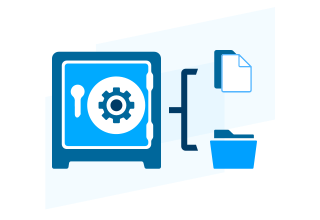
USE CASES
What you can build with CBFS Vault
Package a full, journaled filesystem inside a single file. Good for consolidating, securing, and moving data as one unit.
Consolidate related files into one container
Keep documents, media, and metadata for a case, transaction, or record together in one portable file instead of scattered across folders and databases.
Encrypted, embedded application storage
Embed a secure filesystem right inside your app, with built-in per-file or whole-vault encryption, fully under your app's control.
Portable storage for custom hardware
Create a Vault on flash cards, custom hardware, or raw memory, anywhere data can be persisted. No dependency on a specific host filesystem.
Version history and safe interrupted writes
Keep multiple versions of a file in one Vault, and rely on journaling to recover cleanly if a write gets interrupted.
HOW IT WORKS
A full, journaled filesystem in a single file.
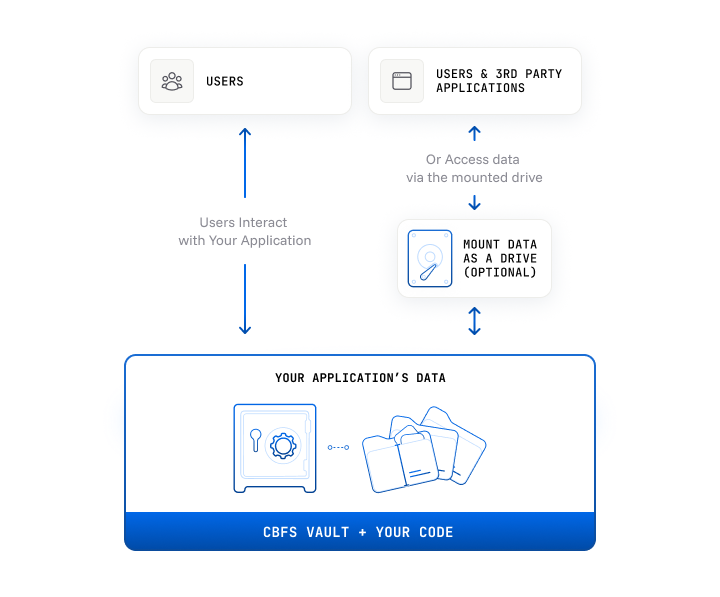
CBFS Vault stores an entire filesystem, files, folders, attributes, metadata, inside one container. That container can live inside your app's binaries, as a standalone data file, or mounted as a removable drive.
Every change gets journaled first. Write data, rename a directory, whatever it is, CBFS Vault logs it internally before committing. If something interrupts the operation, the filesystem restores its own integrity instead of ending up corrupted.
The engine runs entirely in user mode, and end users have no direct access to the raw data, so a Vault is naturally protected against accidental deletion or tampering, while still supporting per-file or whole-vault encryption.
START BUILDING
Documentation & Resources
Online Documentation
Full API reference for all components and languages, with code examples for every method and event.
Read now
Knowledge Base
Troubleshooting guides, how-tos, and answers to common implementation questions.
Read nowSoftware License
Details for commercial use or distribution of products built with CBFS™ Vault.
Read nowSample Applications
Shows how to create a virtual drive from a CBFS Vault file in callback mode.

Demonstrates managing the contents of a CBFS Vault in callback mode.
A basic vault mounting application that creates a virtual drive from a CBFS Storage file.
Creates a virtual memory drive and can load and save data from a CBFS Vault file.
A basic file explorer that can be used to manipulate the contents of a CBFS Vault file.
Show how to manage the contents of a CBFS Vault file.
FEATURES
Consolidate and Organize Multiple Files
 Consolidate and Organize Multiple Files
By embedding a complete filesystem within a single file, CBFS™ Vault allows you to consolidate and organize your application's data rather than having numerous files scattered across multiple folders and databases. Vaults are ideal for storing data for DRM, legal cases, real estate transactions or medical folders, where a number of different file types need to be securely kept together but still readily available and more conveniently backed up.
Maintain Data Integrity
CBFS™ Vault uses journaling to help maintain the integrity of your data. Anytime the filesystem's contents are changed (data is written, a directory is renamed, etc.), information about the change is recorded in a special log file internally. If the operation is interrupted unexpectedly, CBFS™ Vault uses this information to restore the filesystem's integrity. The fact that end-users do not have direct access to your data also affords it a certain level of protection, since it prevents accidental deletions and other unwanted modifications that could cause your application to misbehave.
Streamline Data Access
Applications that utilize a large number of files (documents, multimedia, code, etc.) typically end up sending many requests to the filesystem. This may have noticeable impacts on performance due to the specifics of typical filesystem drivers. CBFS™ Vault reduces the amount of time needed to access your data since its engine operates completely in user mode, and requires few calls to the filesystem.
Handle Compound File Formats
As the desire for "richer" user experiences continues to increase, it's not uncommon for applications to require file formats comprised of several independent parts, or that utilize some sort of embedded metadata. Video files, for example, typically contain not only video content, but also audio tracks and subtitles for one or more languages, plus additional metadata about the video itself. CBFS™ Vault provides features such as alternate data streams, application-defined attributes, and custom metadata; allowing you to work with compound file formats easily and efficiently.
Secure Data with Modern Encryption
CBFS™ Vault includes support for both per-file and whole-file-system encryption mechanisms, so that you — and your end-users — can be confident that your application's data is safe and secure at all times. Applications may rely on either the modern cryptographic algorithms that come built-in, or provide their own encryption implementation via well-defined extension points in the CBFS™ Vault API.
PLATFORMS
Supported Languages & Operating Systems
Every edition ships with a pre-built driver, sample applications, and full documentation. 30-day fully functional trial for all editions.
CBFS Vault supports .NET Framework 4.0+ and .NET 5 through .NET 10, with full Visual Studio integration and C# sample applications.
Documentation
CBFS Vault ships 32-bit and 64-bit Windows DLLs and C++ libraries built for Linux and macOS, with no external runtime dependencies.
Documentation
CBFS Vault provides Java classes built on the same high-performance codebase as our native editions, with full Javadoc and seamless integration into IntelliJ and Eclipse.
Documentation
CBFS Vault ships as Python 3 modules for Windows, Linux, and macOS, installable via PIP with comprehensive HTML documentation and sample applications.
Documentation
CBFS Vault ships as Rust crates built on 32-bit and 64-bit shared libraries for Windows, Linux, and macOS, with support for x86/x64 and ARM.
Documentation
CBFS Vault provides high-performance Go packages built on the same C++ codebase as our native editions, supporting Go 1.13+ on Windows, Linux, and macOS.
Documentation
CBFS Vault provides Android-optimized Java classes built on our shared codebase, with full Javadoc and seamless integration into Android Studio for Android 4.4+.
Documentation
CBFS Vault provides native Delphi VCL components built on our shared codebase, supporting every Delphi version from Delphi 6 through RAD Studio 13.
Documentation
CBFS Vault ships as 32-bit and 64-bit Windows DLLs and C++ libraries for Linux, macOS, and FreeBSD, supporting Qt 4.8, Qt 5, and Qt Creator integration.
Documentation
CBFS Vault ships as a modern XCFramework for macOS, built for native Swift 5 and Objective-C development with full support for Intel and Apple Silicon in Xcode 13+.
Documentation
CBFS Vault ships as a modern XCFramework for iOS, built for native Swift 5 and Objective-C development with full support for Intel and Apple Silicon in Xcode 13+.
DocumentationFAQ
Frequently Asked Questions
Common questions about licensing, integration, and deployment.
What is CBFS Vault?

CBFS Vault is a cross-platform SDK for self-contained file storage containers, a filesystem inside a file. A Vault holds files, folders, metadata, and encryption state in one container that works on any storage medium: a hard drive, flash storage, a database record, raw memory, or custom hardware.
Vaults support random read and write access per file, per-file and whole-vault encryption, compression, journaling for crash resilience, alternate data streams, custom metadata, and multithreaded operations. Embed one in your app binaries, ship it as a standalone data file, or mount it as a removable drive.
How do I package multiple files into a single encrypted container?
CBFS Vault does this directly. The CBVault API lets you create a Vault, add files and folders to it, apply per-file or whole-vault encryption with built-in cryptographic algorithms, and read or write individual files with random access, no need to extract the whole archive for one file.
A Vault is a single file on disk, easy to store, move, back up, or embed in your app package. Available in .NET, C++, Java, Python, Rust, Go, Delphi, Qt, Android, iOS, and macOS.
How does CBFS Vault differ from a ZIP file?
ZIP files need decompression to access or change content, and don't support random writes, versioning, journaling, per-file encryption, or process-level access control. CBFS Vault supports all of that. You can read or write one file in a Vault without touching the others. Journaling protects against corruption if a write gets interrupted. Per-file encryption means different files in the same Vault can use different keys or settings.
CBFS Vault also supports alternate data streams, custom metadata attributes, compound document formats, and multithreaded concurrent access, a full embedded filesystem, not just a compression archive.
How does CBFS Vault maintain data integrity?
CBFS Vault journals every change before committing it. File writes, directory renames, metadata updates all get logged internally first. If a crash or power failure interrupts the operation, CBFS Vault uses the journal to restore a consistent state on next access.
The latest release added new journaling options for tuning the balance between write performance and recovery granularity.
What encryption options does CBFS Vault support?
Both per-file and whole-vault encryption. Per-file encryption lets individual files in the same container use different keys or algorithms. Whole-vault encryption applies one encryption layer across the entire container.
Modern cryptographic algorithms are built in. Extension points let you plug in your own encryption implementation if you need to integrate with existing key management or meet specific compliance requirements.
How does CBFS Vault differ from CBFS Disk?
CBFS Vault manages its own internal structure of files, folders, metadata, and encryption inside a single container, entirely in user space, independent of the OS filesystem. Runs on Windows, Linux, macOS, Android, and iOS.
CBFS Disk creates virtual block-level disk drives that the OS sees as raw storage, then formats a standard filesystem like NTFS or FAT on top. It needs a kernel driver on Windows and is Windows-only. Use CBFS Vault for application-level file containers, embedded formats, and cross-platform work. Use CBFS Disk for whole-disk virtualization or when you need the OS managing the filesystem on top of your storage.
Can a CBFS Vault be mounted as a drive?
Yes. The CBVaultDrive component mounts a Vault as a removable virtual drive, giving users and other apps standard file system access via a drive letter. Good for end-user-facing scenarios where a drive-like interface makes sense alongside the programmatic CBVault API.
Start with a free 30-day trial
Fully functional, no feature restrictions. Free technical support from day one. No credit card required.
TRUSTED BY DEVELOPERS WORLDWIDE
Built for production. Proven at scale.
Components and drivers from Callback Technologies have been shipping in commercial products for over two decades, from single-developer tools to enterprise software deployed at Fortune 500 companies.
I am recommending your company to every developer that asks me. You're really a wonderful example of how software companies should be. Fast, kind with customers, effective and prompt on bugfixes. GREAT!!
Great product! And with all these updates and excellent support really makes me think its 100% worth the money.