
Monitor and control what happens on your filesystem, in real time.
CBFS™ Filter lets you intercept, monitor, and control filesystem, registry, and process manager operations in real time. All without writing a single line of kernel driver code.


USE CASES
What you can build with CBFS Filter
CBFS Filter gives you real-time visibility and control over filesystem, registry, and process activity, all without writing driver code. If it touches the filesystem or the Windows kernel, you can intercept it.
Audit logging and compliance
Record a complete, tamper-evident log of every file access, modification, and deletion across the system. Identify which process touched which file, when, and under which user account. Provides everything compliance and forensics teams need.
File isolation and per-process views
Present different file contents to different processes accessing the same path. One process sees the live decrypted file; another sees only the encrypted version on disk. Useful for sandboxing, DRM enforcement, and secure multi-tenant environments.
Continuous data protection
Intercept every write operation as it happens and capture incremental backups in real time. Recover any version of any file from any point in time, without waiting for a scheduled backup window.
Process and application control
Monitor process and thread creation, restrict which applications can launch, and guard against potentially unwanted programs. Enforce application whitelisting or blacklisting at the kernel level, transparently to end users.
Registry protection and redirection
Intercept registry reads and writes to protect sensitive keys, redirect requests to alternate locations, or inject virtual registry values that only your application controls. Useful for application isolation, licensing enforcement, and configuration management.
Real-time malware and ransomware defense
Block malicious file operations the instant they happen, before a file is encrypted, deleted, or exfiltrated in bulk. Build the detection and blocking engine behind an antivirus or anti-ransomware product without writing driver code.
HOW IT WORKS
No kernel code required.
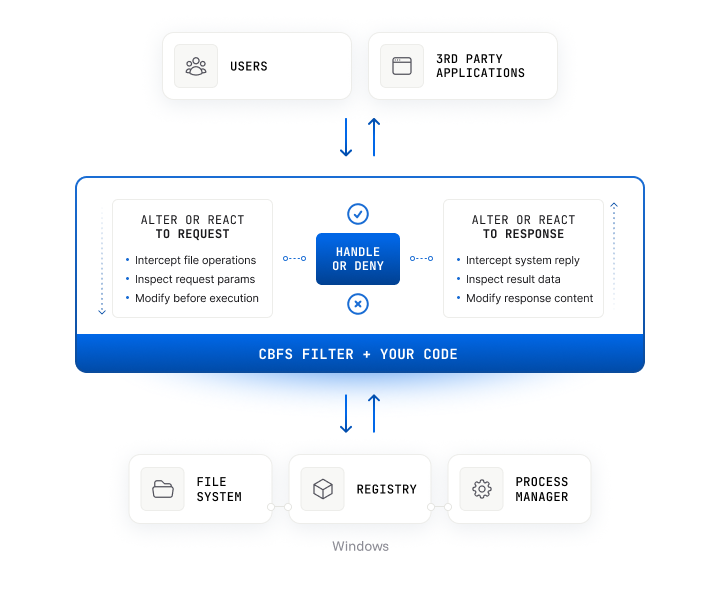
Kernel programming is hard, and writing a minifilter driver from scratch means dealing with complex Windows internals, strict altitude requirements, mandatory driver signing, and the ever-present risk of a system crash if something goes wrong. CBFS Filter provides a safer, more flexible approach: it ships with a pre-built, Microsoft-signed minifilter driver that acts as the intermediary between the filesystem and your application code.
Filesystem, registry, and process manager operations are proxied into callback events that execute in a separate user-space process. You implement handlers for the events you care about: intercept a file open, redirect a registry read, block a process from launching — without ever touching kernel code. Advanced filter rules let you precisely target only the operations relevant to your application, so you're never flooded with events you don't need.
With over 20 years of experience and trusted by security vendors, backup solutions, and enterprise software teams around the world, we understand the kernel so you don't have to.
START BUILDING
Documentation & Resources
Online Documentation
Full API reference for all components and languages, with code examples for every method and event.
Read now
Knowledge Base
Troubleshooting guides, how-tos, and answers to common implementation questions.
Read nowGetting Started With CBFilter
Step-by-step walkthrough for intercepting and controlling filesystem operations using the CBFilter component.
Read nowGetting Started With CBMonitor
Learn how to use CBMonitor to passively observe filesystem activity without affecting the operations being monitored.
Read nowGetting Started With CBProcess
Monitor and control process and thread creation, suspension, and termination using the CBProcess component.
Read nowFile Isolation
Learn how to use file isolation to present different file contents to different processes accessing the same path.
Read nowSample Applications
Shows how to use encrypt rules and process access rules to control access to specific directories.

Hides a specified directory.
Monitors and logs filesystem activity.
A 'no-op' filesystem filter application that you can add your code to.
Emulates the .NET FileSystemWatcher class, but more reliably.
Shows how to use file isolation to encrypt and decrypt files for specific processes.
Illustrates how to replace a placeholder file with actual data.
A basic process monitoring application.
A basic registry monitoring application.
FEATURES
Comprehensive Features for Maximum Performance
Proactively Intercept and React to Requests
 Proactively Intercept and React to Requests
CBFS™ Filter's robust, rules-based filtering engine is flexible enough to handle use-cases of any scale and complexity. Target the requests you care about with surgical precision, then react to them as they occur.
Log System Activity for Auditing Purposes
Get a complete picture of who or what is accessing your information. CBFS™ Filter's comprehensive monitoring capabilities let you keep a detailed record of everything that happens on your system.
Secure Files and Enforce Access Restrictions
Implement on-the-fly file encryption, using algorithms of your choice, for deeply-integrated data security. Leverage intelligent access rules to enforce targeted access restrictions via a modern minifilter driver.
File Isolation
File isolation allows different processes to see different file contents when viewing the same file. For example, one process may see decrypted content, while another process would see only encrypted data.
More Reliable than FileSystemWatcher
Never miss a filesystem operation again thanks to CBFS™ Filter's low-level integration. A dedicated filesystem monitoring component provides everything you need.
Implement Continuous Data Protection (CDP)
Continuously record all filesystem changes, and back up content revisions in real time as each modification occurs. Encrypt the backups before storing them for added peace of mind.
Simple Deployment
The simplified deployment scheme eliminates architecture detection and potential errors. A single CAB file contains all of the drivers and Helper DLLs that are necessary for driver installation.
Flexible Filter Options
Set multiple instances at different altitudes, allowing you to intercept requests before or after other filters.
Create Virtual Files and Registry Keys
Create virtual files and registry keys populated with application-defined data. Windows will recognize them as real, so third-party applications can interact with them in the usual manner.
Monitor Process and Thread Activity
Keep an eye on applications' process and thread activity. Limit access rights to prevent undesired creation, suspension, and termination; and to guard against potentially unwanted programs (PUPs).
Manage and Protect Registry Keys
Full control over registry key creation, modification, enumeration, and deletion allows you to protect registry keys and their values. You can even redirect requests to other registry keys.
PLATFORMS
Supported Languages & Operating Systems
Every edition ships with a pre-built driver, sample applications, and full documentation. 30-day fully functional trial for all editions.
CBFS Filter supports .NET Framework 4.0+ and .NET 5 through .NET 10 with a robust Windows-only driver, full Visual Studio integration, and C# sample applications.
Documentation
CBFS Filter ships as 32-bit and 64-bit Windows DLLs built on our high-performance C++ codebase, with precompiled binaries for x86/x64 and ARM.
Documentation
CBFS Filter provides Java classes supporting JDK 1.7 and up, managing a robust Windows-only driver, with full Javadoc and seamless integration into IntelliJ and Eclipse.
Documentation
CBFS Filter ships as Python 3 modules managing a robust Windows-only driver, installable via PIP with comprehensive HTML documentation and sample applications.
Documentation
CBFS Filter ships as Rust crates built on top of 32-bit and 64-bit Windows DLLs, with support for x86/x64 and ARM architectures.
Documentation
CBFS Filter provides high-performance, C++-based Go packages built as 32-bit and 64-bit Windows DLLs, supporting Go 1.13 and later.
Documentation
CBFS Filter provides native Delphi VCL components wrapping a Windows-only driver, supporting every Delphi version from Delphi 6 through RAD Studio 13.
Documentation
CBFS Filter ships as 32-bit and 64-bit Windows DLLs supporting Qt 4.8 and Qt 5, with seamless Qt Creator integration and Qt GUI sample applications.
DocumentationFAQ
Frequently Asked Questions
Common questions about licensing, integration, and deployment.
Do I need to write or sign a kernel-mode driver?

No. CBFS™ Filter ships with a pre-built, Microsoft-signed minifilter driver. Your code runs entirely in user space as a standard process, responding to filesystem and system callback events. You never touch kernel code, and the driver never needs to be recompiled or re-signed when your application changes.
What is the difference between CBFilter and CBMonitor?
CBFilter is an active filter: it intercepts filesystem operations before they complete, allowing your application to modify data, block requests, redirect operations, or change access permissions in real time. CBMonitor is a passive observer: it notifies your application of filesystem activity after the fact, without the ability to alter the outcome. Use CBFilter when you need to control operations; use CBMonitor when you only need to observe them.
What operations can CBFS™ Filter intercept?
CBFS™ Filter covers filesystem operations (file open, read, write, rename, delete, and more), Windows registry operations (key creation, modification, enumeration, deletion, and redirection), and process and thread lifecycle events (creation, suspension, and termination). Advanced filter rules let you target only the specific paths, processes, or operation types your application cares about.
What is file isolation and when should I use it?
File isolation allows different processes to see different file contents when accessing the same path. For example, one process may receive the decrypted version of a file while another sees only the encrypted bytes on disk. It is useful for DRM enforcement, per-user content views, sandboxed environments, and any scenario where different callers should receive different data from the same file.
What languages and platforms does CBFS™ Filter support?
CBFS™ Filter supports .NET, C++, Java, Python, Rust, Go, Delphi, and Qt on Windows. Visual Studio integration and sample applications in every supported language are included.
How is CBFS™ Filter licensed, and can I redistribute the driver?
Each license is tied to a single developer seat and permits unlimited royalty-free deployment to end-user machines. Licenses are perpetual for the purchased version. The signed minifilter driver may be redistributed as part of your application installer — no additional licensing or signing is required on your end.
Start with a free 30-day trial
Fully functional, no feature restrictions. Free technical support from day one. No credit card required.
TRUSTED BY DEVELOPERS WORLDWIDE
Built for production. Proven at scale.
Components and drivers from Callback Technologies have been shipping in commercial products for over two decades, from single-developer tools to enterprise software deployed at Fortune 500 companies.
You make a really great product. I was toying with making a minifilter myself in C++ to do this simple redirect, but it was infinitely easier with your SDK.
We would be glad to recommend your product. It is very intuitive, easy and comfortable to use. The code and license were delivered just an hour after payment. Your support is efficient. Thanks a lot!