
Windows Guide: Callback Drive for WebDAV
Requirements: Callback Drive for WebDAV
Callback Drive for WebDAV is an easy-to-use utility that mounts any WebDAV server as a Windows drive. Once connected, you can browse, open, and save files from Explorer or any application just like local storage. The application is simple to configure, yet flexible and designed with security (HTTPS and common authentication methods) and performance in mind.
Instructions
Connecting a drive to a remote WebDAV server with Callback Drive for WebDAV is the primary function of the product and is designed to be simple. The following basic steps are all that's needed to mount a drive.
From the Drives tab of the main window, click New... to open the Edit Drive dialog.

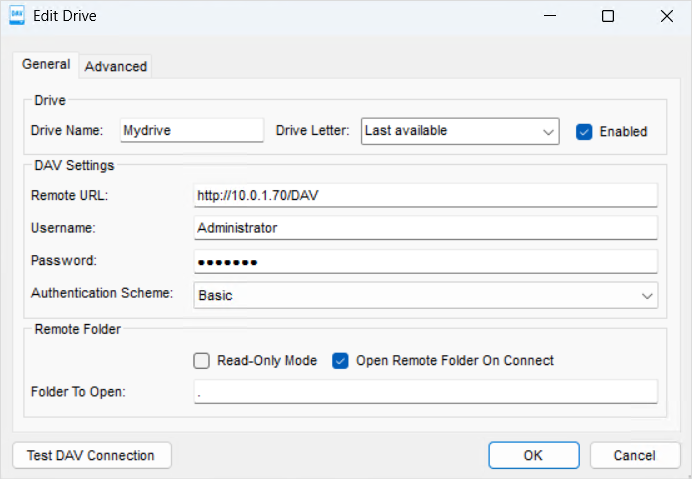
On the Edit Drive dialog, enter a local drive name, choose a drive letter, and enter WebDAV server information for Callback Drive for WebDAV. Click Test DAV Connection to verify the connection to the server, then press OK to save the new drive configuration.
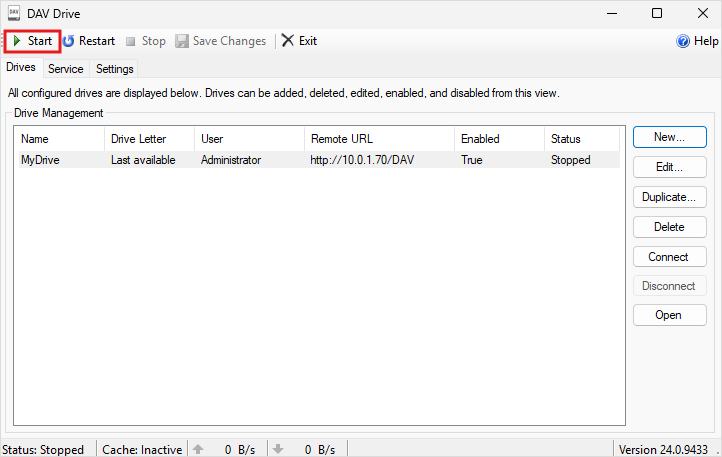
Press Start on the main window to connect all the enabled drives.
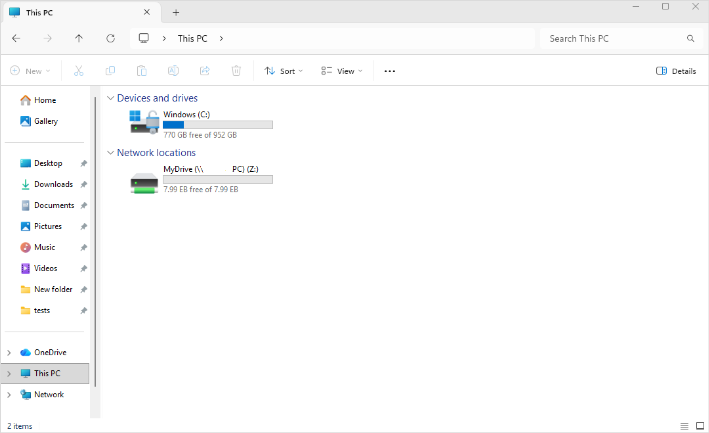
The drive should now be visible in Explorer and available to access by any application on the machine.
We appreciate your feedback. If you have any questions, comments, or suggestions about this article please contact our support team at support@callback.com.